Author Resource
The Best Writing Software for Authors: Why Scrivener Has Become the Gold Standard
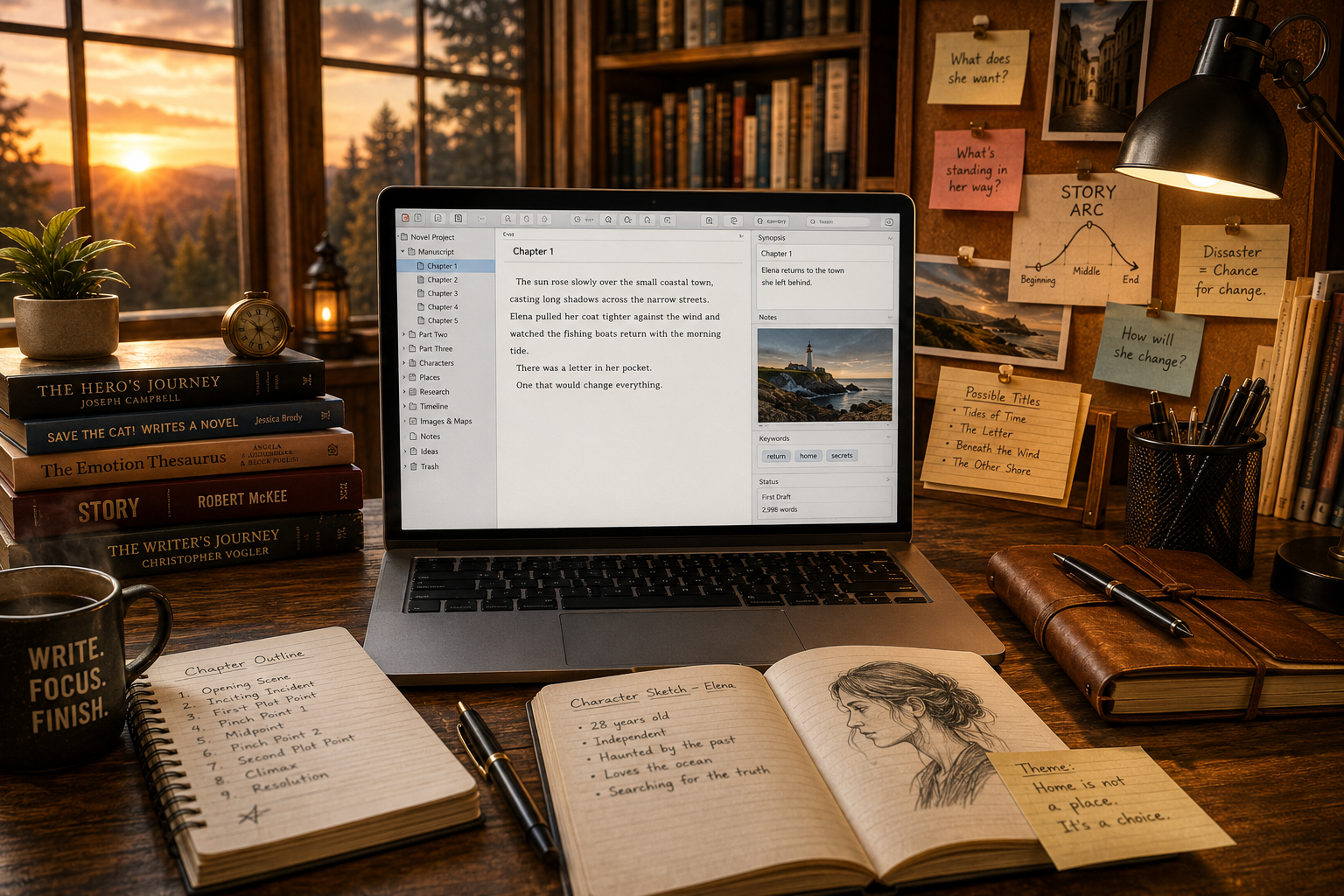
Whether you're writing your first novel, your fifth nonfiction book, a screenplay, or a doctoral dissertation, the tools you choose matter. While many writers begin with Microsoft Word or Google Docs, countless professionals eventually discover that there is a better way to organize complex writing projects. That software is Scrivener.
Writing a book is unlike writing almost anything else.
A novel may contain eighty chapters, dozens of characters, multiple timelines, hundreds of research notes, and thousands of revisions before it reaches publication. A nonfiction book may require interviews, reference material, citations, photographs, outlines, and appendices. Screenplays demand precise formatting, while researchers often juggle hundreds of source documents.
Trying to manage all of that inside a single Word document quickly becomes frustrating. Scrolling endlessly to find Chapter 18, hunting for research notes hidden in separate folders, or copying and pasting scenes into new locations wastes valuable writing time.
That is precisely the problem Scrivener was built to solve.
Developed by Literature & Latte, Scrivener has earned an almost legendary reputation among authors for one simple reason: it was designed by writers for writers. Instead of forcing authors to adapt their workflow to generic word-processing software, Scrivener organizes an entire writing project into a single workspace where every chapter, note, character profile, image, outline, and research file lives together.
For many writers, discovering Scrivener feels less like purchasing new software and more like finally finding the office they always wished they had.
Writing a Book Isn't the Same as Writing a Letter
Traditional word processors excel at creating letters, reports, resumes, and business documents. They were never intended to manage a 120,000-word fantasy novel, a seven-book series, or years of accumulated research.
Anyone who has written a long manuscript has probably experienced at least one of these situations:
Scrolling endlessly to locate a particular chapter.
Maintaining dozens of separate files for notes.
Accidentally deleting important text.
Losing track of character details.
Reorganizing chapters through endless copy-and-paste.
Searching multiple folders for research material.
Forgetting where a scene belongs.
These problems become more common as a project grows.
Scrivener approaches writing differently.
Instead of treating your manuscript as one massive document, it treats it as a collection of manageable pieces that work together.
Every chapter becomes its own document.
Every scene becomes movable.
Every research note has a permanent home.
Everything remains connected.
One Project. Everything Organized.
The first thing new users notice is Scrivener's Binder.
Think of it as the table of contents for your entire creative project.
Instead of one endless document, your manuscript appears as an expandable folder structure that might include:
Front Matter
Chapter One
Chapter Two
Character Profiles
Locations
Historical Research
Maps
Images
Timeline
Notes
Deleted Scenes
Ideas for Future Books
Click any item, and it instantly opens.
Need to rewrite Chapter 14?
Click Chapter 14.
Need to review your villain's backstory?
Click Characters.
Need to verify a historical date?
Click Research.
Everything is available without opening another application.
This organization alone has convinced countless authors to make Scrivener their permanent writing platform.
The Freedom to Write Out of Order
Many writers don't write books from beginning to end.
An ending might appear before Chapter One.
A dialogue exchange may arrive weeks before the surrounding chapters.
An exciting action sequence might interrupt work on the introduction.
Traditional word processors encourage linear writing.
Scrivener encourages creative writing.
Each chapter exists independently, allowing you to work wherever inspiration strikes.
Finish Chapter Twenty before Chapter Three?
No problem.
Write the ending first?
Perfectly acceptable.
Need to move Chapter Nine ahead of Chapter Seven?
Simply drag it into place.
The software reorganizes everything automatically.
Instead of managing documents, you focus on telling the story.
The Corkboard That Writers Love
Ask experienced Scrivener users what feature they miss most when using another writing program, and many will immediately mention the Corkboard.
Imagine spreading index cards across a large table.
Each card represents one chapter or one scene.
You can quickly see the flow of your entire book.
Need more tension?
Move a scene.
Need to introduce a character earlier?
Drag the card.
Need to split one chapter into three?
Create additional cards.
The Corkboard transforms story structure into something visual and intuitive.
For novelists especially, this feature alone can dramatically simplify plotting.
Outlining Without Feeling Restricted
Some authors are meticulous planners.
Others discover their stories while writing.
Scrivener supports both approaches.
If you're an outliner, you can build a detailed structure before writing your first paragraph.
If you're a discovery writer, you can ignore the outline entirely until later.
Need to switch methods halfway through?
Go ahead.
Scrivener adapts to your workflow rather than forcing one upon you.
Research That Never Leaves Your Manuscript
Professional writing often requires extensive research.
Historical novels require timelines.
Mysteries demand investigative details.
Nonfiction books reference studies.
Biographies include interviews.
Academic papers rely on source material.
Normally, writers bounce between browser tabs, PDF files, folders, photographs, and note-taking applications.
Scrivener eliminates much of that chaos.
Research documents can live directly inside your project.
Store PDFs.
Images.
Maps.
Web pages.
Interview notes.
Character sketches.
Reference documents.
Everything stays beside the manuscript instead of scattered across your computer.
Instead of searching for information, you simply keep writing.
Focus on Writing, Not Formatting
One of Scrivener's biggest philosophical differences is simple:
Write first.
Format later.
Many writers waste hours adjusting fonts, spacing, margins, headers, page numbers, and chapter breaks while still drafting.
Scrivener encourages the opposite.
Draft freely.
Revise thoroughly.
Then, when you're finished, use the Compile feature to export your manuscript into professionally formatted documents suitable for Word, PDF, EPUB, Kindle, print publishing, or numerous other formats.
This separation keeps writers focused on creating instead of endlessly tweaking appearance.
Less Stress, More Creativity
Perhaps Scrivener's greatest achievement isn't a particular feature.
It's the reduction of mental clutter.
When your manuscript, notes, research, ideas, character sheets, and outlines all live inside one organized project, your brain spends less energy managing files and more energy solving creative problems.
That's difficult to measure.
But nearly every long-time Scrivener user describes the same feeling:
Writing becomes calmer.
Writing becomes clearer.
Writing becomes enjoyable again.
Why Professional Writers Choose Scrivener
Every successful writer eventually develops a system.
Some use stacks of index cards.
Others cover walls with sticky notes.
Some maintain binders full of research, timelines, maps, and character biographies.
The common thread isn't the method, it's organization.
Professional writing is rarely a straight line from the first sentence to the last. It is an ongoing process of discovery, revision, rearrangement, and refinement. New ideas appear unexpectedly. Entire chapters are rewritten. Characters evolve. Research uncovers better directions. The manuscript grows into something far more complex than it appeared on day one.
Scrivener was built with that reality in mind.
Instead of forcing authors to adapt to software designed for office documents, it provides a workspace that mirrors the way creative minds actually work.
Every Character Has a Home
Readers notice consistency.
They remember eye color.
They remember birthdays.
They remember hometowns.
They remember details that authors sometimes forget.
How many times have writers reached Chapter Twenty only to wonder:
"What color were her eyes?"
"What was his middle name?"
"Did I already mention that?"
Scrivener solves this elegantly.
Create dedicated character sheets inside your project.
Store:
Physical descriptions
Personality traits
Family relationships
Occupations
Dialogue notes
Motivations
Backstory
Secrets
Story arcs
Need to confirm a detail while writing?
Open the character profile.
Continue writing.
No searching.
No separate folders.
No guessing.
The same applies to locations, organizations, magical systems, historical timelines, technology, or anything else your story depends upon.
Everything stays together.
Revision Without Fear
Every writer deletes good writing.
The difference between experienced authors and beginners is that experienced authors understand nothing is ever truly wasted.
Sometimes an entire chapter disappears.
Sometimes a favorite conversation no longer fits.
Sometimes the opening scene becomes Chapter Eight.
Scrivener makes revision remarkably painless.
Because each section exists independently, restructuring a manuscript feels natural rather than intimidating.
Entire chapters can be moved with a simple drag.
Scenes can be split.
Folders reorganized.
Unused material stored instead of discarded.
Rather than fearing revision, authors often begin embracing it.
Keep Every Draft Safe
One of the greatest fears among writers is losing work.
Hard drives fail.
Files become corrupted.
Accidental deletions happen.
Scrivener includes automatic backup features designed to help protect your projects.
Combined with cloud storage or external backups, writers gain peace of mind knowing their manuscripts are protected against many of the disasters that have haunted authors for decades.
Nothing replaces a disciplined backup strategy, but Scrivener makes protecting your work far easier than relying on a single document stored on your desktop.
Powerful Search Across an Entire Project
As manuscripts grow, finding information becomes increasingly difficult.
Perhaps you remember mentioning an old cabin.
Or a particular quote.
Or a mysterious key.
Or the name of a secondary character.
Instead of manually scrolling through hundreds of pages, Scrivener searches your entire project in seconds.
Need every mention of "Blackwood Manor"?
Search.
Need every appearance of Detective Harris?
Search.
Need every scene mentioning wolves?
Search.
The time savings become substantial over the course of writing an entire book.
Built for Every Kind of Writer
Although Scrivener is famous among novelists, its usefulness extends far beyond fiction.
Many nonfiction authors use it to organize interviews, chapter research, source material, outlines, and illustrations.
Screenwriters appreciate dedicated screenplay formatting and scene management.
Students rely on it for dissertations, theses, and research papers.
Journalists manage extensive investigative material.
Content creators organize ebooks, online courses, newsletters, and long-form articles.
Anyone producing substantial written work can benefit from having an organized workspace designed specifically for complex projects.
Scrivener vs. Microsoft Word
Microsoft Word remains one of the world's most popular writing applications, and for good reason. It is familiar, powerful, and widely accepted.
But books expose its limitations.
Microsoft Word
Scrivener
One large document
Project-based organization
Limited manuscript navigation
Instant chapter navigation
Research stored separately
Research stored inside project
Manual chapter movement
Drag-and-drop structure
Formatting during drafting
Write first, compile later
Basic outlining
Advanced Binder, Corkboard, and Outliner
Word remains excellent for editing finished manuscripts.
Scrivener excels during the creative process.
Many professional authors actually use both, writing inside Scrivener before exporting to Word for editors, publishers, or proofreaders.
Scrivener vs. Google Docs
Google Docs offers impressive collaboration features.
Its cloud-based nature makes it ideal for shared documents.
However, long-form writing often reveals its weaknesses.
Large manuscripts become increasingly cumbersome.
Research must remain elsewhere.
Organization becomes dependent on folders instead of integrated project management.
Scrivener places everything inside one cohesive workspace.
For solo authors building books, that difference is significant.
Scrivener vs. Atticus
Atticus has become increasingly popular because it combines writing and book formatting inside a browser-based platform.
It is particularly attractive for authors focused on self-publishing.
Scrivener, however, remains the deeper writing environment.
Its organizational tools, Binder, Corkboard, Outliner, research management, and project flexibility remain among the most sophisticated available.
Many authors draft inside Scrivener before importing into Atticus for final formatting.
The two applications often complement each other rather than compete directly.
Is Scrivener Difficult to Learn?
This is perhaps the most common question prospective users ask.
The honest answer is yes, but only at first.
Opening Scrivener for the first time can feel overwhelming because it offers far more capability than a traditional word processor.
The mistake many beginners make is trying to learn every feature immediately.
Don't.
Start by writing.
Learn the Binder.
Then the Corkboard.
Then Collections.
Then Compile.
Most writers become comfortable surprisingly quickly, and many later wonder how they ever managed large projects without it.
Who Should Buy Scrivener?
Scrivener is an outstanding investment for:
Novelists
Nonfiction authors
Memoir writers
Children's book authors
Screenwriters
Playwrights
Students
Professors
Researchers
Journalists
Bloggers creating long-form content
Course creators
Freelance writers
If your writing regularly exceeds a few thousand words, Scrivener is likely to become one of the most valuable tools in your creative workflow.
Our Recommendation
There is no software capable of writing your book for you.
There is no application that replaces imagination, discipline, or persistence.
But there are tools that remove friction.
Scrivener is one of those tools.
It helps writers stay organized, think more clearly, revise more confidently, and manage projects that would otherwise become difficult to control.
That is why it continues to be recommended by bestselling novelists, award-winning nonfiction authors, screenwriters, academics, and serious writers around the world.
If you're ready to stop wrestling with documents and start focusing on your writing, Scrivener is well worth exploring.
👉 Learn more or download Scrivener here:
Whether you're beginning your first novel or finishing your tenth, investing in better writing tools is an investment in your future as an author.